In today’s digital world, streaming music and videos dominate our online experience. A Chrome audio equalizer extension can transform flat browser sound into something immersive. Whether you’re watching YouTube or listening to Spotify, customizing audio makes a huge difference.
Many users search for “Sound Booster & Equalizer” to enhance their setup. This tool stands out with its 10-band precision and bass booster features. It’s perfect for anyone tired of default browser audio.
How to install Sound Booster & Equalizer?
Click the Install button above and click “Add to Chrome.” The browser is added in extensions bar. 🙂
Why You Need a Browser Audio Equalizer
The default browser sound often lacks depth and clarity. Without an equalizer, lows feel muddy and highs too sharp. A dedicated Chrome audio enhancer fixes this instantly.
Searches for “audio equalizer for Chrome” spike as more people stream content. This extension turns your browser into a mini studio. It works seamlessly across sites, no extra software needed.
Imagine adjusting frequencies in real-time for cleaner sound. That’s the power of a browser equalizer. It elevates everyday listening without complicated setups.
Introducing Equalizer for Your Browser: Key Features
This Chrome extension redefines browser audio customization. It’s packed with tools like a 10-band equalizer and surround sound. Users love its simplicity and power.
Designed for music lovers and movie fans alike. It supports all major streaming platforms. Let’s dive into its standout features.
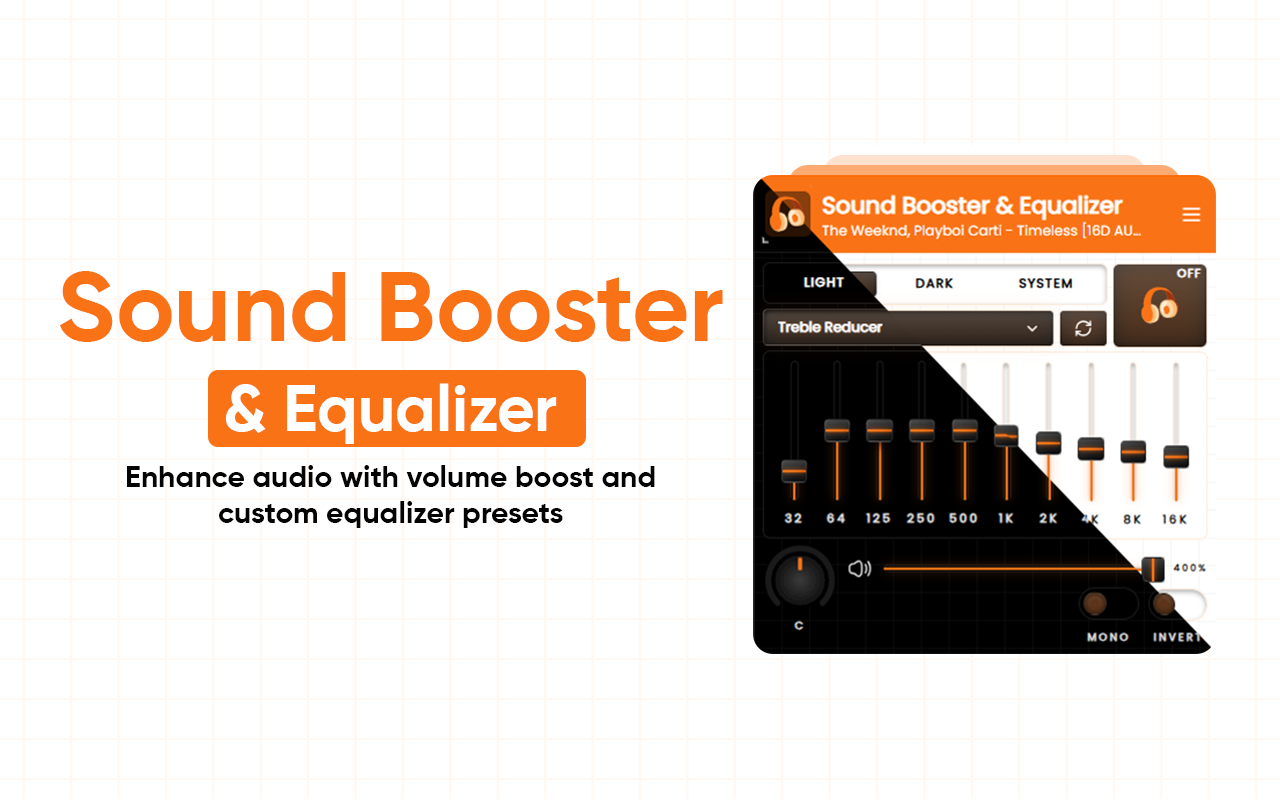
10-Band Audio Equalizer: Precision Control
A 10-band equalizer lets you tweak specific frequencies. Adjust lows for deeper bass or highs for crisp vocals. This level of control is rare in free Chrome extensions.
Searching “10-band equalizer Chrome” often brings up this tool. It ranges from 31Hz to 16kHz bands. Fine-tune to match your headphones or speakers.
No more generic sound profiles. Real-time adjustments show immediate results. It’s ideal for audiophiles seeking balanced audio.
Presets for Every Genre: Ready-to-Use Magic
With 21 presets, switching moods is effortless. Rock, Pop, Jazz, Classical, EDM – all covered. These are crafted for optimal sound in each style.
“Music presets Chrome equalizer” is a popular query. Edit any preset and save custom ones. Perfect for playlists or video marathons.
Use them for movies too. Enhance dialogue clarity or boost action scenes. Instant switches keep your experience flowing.
- Rock: Punchy mids and strong bass.
- Classical: Smooth highs for orchestral depth.
- EDM: Amplified lows for club-like vibes.
- Pop: Balanced for catchy hooks and vocals.
Bass Booster & Volume Boost: Add Power and Depth
The dedicated bass booster adds rumble without distortion. Pair it with a volume boost for louder output. Great for quiet videos or weak speakers.
“Bass booster Chrome” searches highlight this feature’s demand. It increases max volume safely. Keep audio clear even at high levels.
Feel the difference in tracks with heavy beats. No clipping or muddiness. It’s a game-changer for bass-heavy genres.
Works Across the Web: Universal Compatibility
This equalizer applies to YouTube, Netflix, Spotify, and more. One extension handles all browser audio. No site-specific tweaks required.
“Equalizer for YouTube” is a top long-tail keyword. It enhances videos and music streams equally. Seamless integration means no interruptions.
Forget tab-by-tab adjustments. Global control simplifies everything. It’s designed for the modern web user.
Surround Sound Effect: Immersive Listening
Virtual surround sound creates space and depth. Tracks feel wider, like a live performance. Ideal for headphones or built-in speakers.
“Surround sound Chrome extension” gains traction. It adds detail to every note. Experience movies with theater-like immersion.
Adjust intensity for personal preference. No need for expensive hardware. This feature alone upgrades your setup.
Fully Customizable Sound: Your Audio, Your Way
Tweak individual bands in real-time. Smooth harsh edges or boost vocal clarity. Save settings for quick access later.
“Customizable browser audio equalizer” appeals to power users. Unlimited profiles for different scenarios. Switch between work calls and music effortlessly.
- Real-time frequency adjustments.
- Harsh audio smoothing tools.
- Vocal enhancement options.
- Unlimited saved profiles.
Benefits of Using a Bass Booster Chrome Extension
Boosted bass adds excitement to music. It makes tracks more engaging without external amps. Perfect for laptop users.
Volume boost helps in noisy environments. Hear details clearly at higher levels. No distortion means safe listening.
Overall, sound quality improves dramatically. “Volume booster for browser” searches show their popularity. This extension delivers on all fronts.
Health benefits include reduced strain from low volumes. Customized audio prevents ear fatigue. It’s a smart addition to your browser.
Comparing This Equalizer to Other Chrome Audio Enhancers
Many extensions offer basic EQ, but few match this one’s depth. Competitors like “Ears: Bass Boost” lack 10 bands. This tool provides more precision.
“Audio Equalizer for Chrome” alternatives often miss presets. Here, 21 options cover every genre. Surround sound sets it apart.
User ratings favor comprehensive features. “Best Chrome equalizer extension” reviews praise its versatility. It’s free and ad-light.
Drawbacks? Some report minor lag on old devices. But updates keep it optimized. Overall, it leads the pack.
| Feature | This Extension | Competitor A | Competitor B |
|---|---|---|---|
| Bands | 10 | 5 | 8 |
| Presets | 21 | 10 | 15 |
| Bass Boost | Dedicated | Basic | None |
| Surround | Yes | No | Yes |
| Volume Boost | Up to 200% | 150% | 100% |
Tips and Tricks for Optimal Browser Sound Enhancement
Start with presets, then customize. For “Sound Booster & Equalizer” use the EDM preset for vlogs. Adjust mids for better speech.
Pair with quality headphones. Built-in speakers benefit from bass boost. Test on different sites for consistency.
Save profiles for day/night use. Lower highs at night to avoid harshness. “Browser sound booster” tips include gradual volume increases.
Monitor CPU usage on multiple tabs. Close unused ones for smoother performance. Regular updates ensure new features.
- Experiment with surround on podcasts.
- Boost volume for conference calls.
- Custom presets for gaming audio.
- Combine with ad-blockers for clean streams.
Common Issues and Fixes for Chrome Equalizer Extensions
If the sound doesn’t change, refresh the tab. Conflicts with VPNs can occur. Disable temporarily to test.
No audio? Check browser permissions. Allow the microphone if needed, though rare. Reinstall fixes most glitches.
Updates might reset presets. Save them externally as notes. “Chrome audio equalizer not working” fixes are simple.
Contact support via the store page. Community forums offer quick help. Stay updated for bug fixes.
Why This is the Best Free Audio Equalizer for Chrome in 2026
As streaming evolves, audio quality matters more. This extension keeps pace with demands. It’s free, powerful, and user-focused.
Searches like “free Chrome extension for sound enhancement” point here. No subscriptions or upsells. Pure value.
Future updates promise more presets. AI-driven suggestions could come. It’s built for long-term use.
User Stories: Real Experiences with Browser Audio Customization
One user said, “Transformed my YouTube sessions.” The bass booster made workouts epic. Easy to use daily.
Another praised presets for classical music. “Depth I never had before.” Surround sound immersed them fully.
Gamers love volume boost. Clearer effects without distortion. “Best bass booster Chrome” feedback is glowing.
Professionals use it for calls. Vocal clarity shines. Custom settings save time.
The Future of Audio Enhancers in Browsers
Browsers are becoming entertainment hubs. Equalizers will integrate deeper. Expect voice AI for auto-adjustments.
“Audio enhancer Chrome” trends upward. Mobile compatibility might expand. Cross-device syncing is next.
This extension leads innovation. Community input drives features. Stay tuned for enhancements.
Conclusion: Take Control of Your Browser Sound Today
Don’t settle for mediocre audio. Install this Chrome audio equalizer extension now. Hear the difference in every stream.
With bass booster, volume boost, and presets, it’s unbeatable. Search “equalizer Chrome extension” and join thousands.
Customize, enhance, and enjoy. Your browser audio studio awaits. Download today and elevate your sound.