By using this site, you agree to the Privacy Policy and Terms of Use.
Accept
Softweb TutsSoftweb TutsSoftweb Tuts
  • Chrome Extension
  • Artificial Intelligence
  • JavaScript
  • Information
Search
© 2024 Softweb Tuts. All Rights Reserved.
Reading: Delete ChatGPT Chats in Bulk – Browser Extension
Share
Notification Show More
Font ResizerAa
Softweb TutsSoftweb Tuts
Font ResizerAa
  • Chrome Extension
  • Artificial Intelligence
  • JavaScript
  • Information
Search
  • Chrome Extension
  • Artificial Intelligence
  • JavaScript
  • Information
Follow US
© 2024 Softweb Tuts. All Rights Reserved.
Softweb Tuts > Chrome Extension > Delete ChatGPT Chats in Bulk – Browser Extension
Chrome Extension

Delete ChatGPT Chats in Bulk – Browser Extension

Muzammil
Last updated: January 10, 2026 3:57 pm
Muzammil
Share
4 Min Read
Easily Archive or Delete ChatGPT Chats in Bulk
SHARE

Managing dozens—or hundreds—of ChatGPT conversations can quickly become overwhelming. ChatGPT Bulk Delete Chats is a lightweight browser extension designed to help you archive or delete multiple ChatGPT chats at once, saving time and keeping your workspace clutter-free.

Contents
Bulk Chat Management Made Simple🧹 Take Control of Your ChatGPT History- Install NowDelete or Archive With One ClickFind What You Need, FasterSeamless, Smart UIDelete ChatGPT Chats in Bulk — Faster & SmarterWhy Bulk Chat Deletion MattersDelete ChatGPT Chats in Bulk in SecondsArchive What You Want to KeepSearch, Filter, and Manage EfficientlyClean Interface, Better FocusWhy Use ChatGPT Bulk Delete Chats?

Bulk Chat Management Made Simple

Instead of deleting chats one by one, this extension adds checkbox-based selection directly into the ChatGPT interface. Select multiple conversations in seconds and take action instantly—no repetitive clicks, no frustration.

🧹 Take Control of Your ChatGPT History- Install Now

Install ChatGPT Bulk Delete Chats

Delete or Archive With One Click

Whether you want a clean slate or want to hide old conversations, the extension gives you full control. Bulk delete chats you no longer need, or archive important ones so they’re out of sight but safely stored.
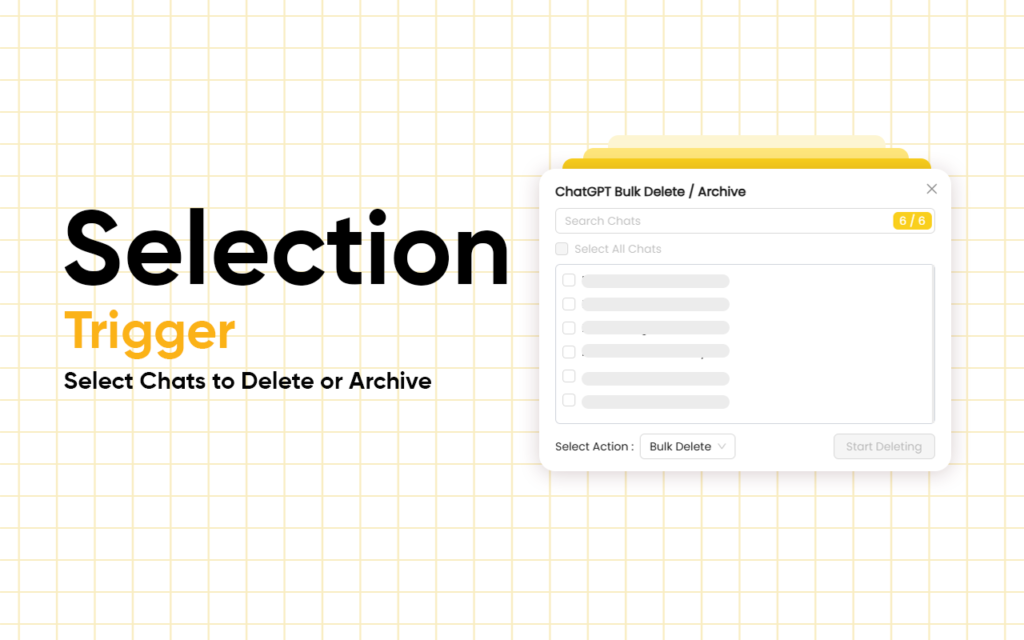
Easily Archive or Delete ChatGPT Chats in Bulk

Find What You Need, Faster

Built-in search and filtering tools make it easy to locate specific conversations before taking action. This is especially useful for power users, developers, writers, and researchers who rely on ChatGPT daily.

Seamless, Smart UI

The extension features a smart, native-looking UI that blends perfectly with ChatGPT. No clutter, no learning curve—just a smooth experience that feels like a natural upgrade to ChatGPT itself.

Easily Archive or Delete ChatGPT Chats in Bulk

Delete ChatGPT Chats in Bulk — Faster & Smarter

Managing a large number of conversations can quickly become frustrating, especially for daily ChatGPT users. The ability to delete ChatGPT chats in bulk helps you stay organized and saves valuable time.

Why Bulk Chat Deletion Matters

Deleting chats one by one is slow and distracting. When your sidebar is full of old or irrelevant conversations, it becomes harder to focus on what actually matters. Bulk deletion solves this problem instantly.

Delete ChatGPT Chats in Bulk in Seconds

This browser extension lets you select multiple ChatGPT chats at once using simple checkboxes. With just a few clicks, you can delete multiple conversations together instead of repeating the same action again and again.

Archive What You Want to Keep

Not ready to delete everything? You can archive important chats to keep them safe while removing clutter from your main view. This gives you full control over your chat history.

Search, Filter, and Manage Efficiently

Built-in search and filtering tools help you quickly find specific conversations before taking action. This makes it easy to manage ChatGPT chats in bulk with confidence and precision.

Clean Interface, Better Focus

The extension blends seamlessly into the ChatGPT interface with a smart, intuitive design. It’s lightweight, fast, and helps you maintain a clean workspace—so you can focus on better conversations, not cleanup.

Why Use ChatGPT Bulk Delete Chats?

  • Save time by managing chats in bulk
  • Keep your ChatGPT workspace organized
  • Reduce mental clutter and improve focus
  • Enjoy a fast, lightweight, and reliable tool

Clean up smarter. Work faster. Stay organized.
Share This Article
Facebook Twitter Copy Link Print
Share
By Muzammil
Follow:
I am Muzammil, a Self-taught Web Designer & Developer. I haven't yet completed my college degree. Started learning programming at the age of 12 and still learning. I love to work in JavaScript and make eye-catchy designs. Free for your calls :)
Previous Article Capture It - Capture & Edit Screenshots Capture It – Capture and Edit Screenshots In your Browser
Leave a comment Leave a comment

Leave a Reply Cancel reply

Your email address will not be published. Required fields are marked *

Latest News

Capture It - Capture & Edit Screenshots
Capture It – Capture and Edit Screenshots In your Browser
Chrome Extension Tool January 10, 2026
Prompt Library - Save and Organize your Prompts
Prompt Library – Unlock Prompt Efficiency with This Browser Extension
Chrome Extension Information August 15, 2025
React Web Workers
Master React Web Workers: Ultimate How-To Guide!
Information JavaScript August 14, 2025
Page Scroll Progress Bar in Blogger
How to add Page Scroll Progress Bar in Blogger
Uncategorized July 12, 2025
Featured on Twelve Tools Featured on Aura++ Featured on Open-Launch Capture It - Capture & Edit Screenshots - Live on FoundrList Listed on Turbo0 softwebtuts.com - Featured on Startup Fame Featured on Startups Lab Featured on LaunchIgniter Featured on findly.tools Fazier badge Capture It - Capture & Edit Screenshots badge Latest AI Updates
Softweb TutsSoftweb Tuts
Follow US
© 2025 Softweb Tuts. All Rights Reserved.
adbanner
AdBlock Detected
Our site is an advertising supported site. Please whitelist to support our site.
Okay, I'll Whitelist
Muzammil - Man Behind Softweb Tuts
Welcome Back!

Sign in to your account

Lost your password?