Introduction
Welcome to the Privacy Policy of “WACS – WhatsApp Contacts Saver” (the “Google Chrome Extension”). This Extension is designed to export phone numbers from WhatsApp groups. We value your privacy and are committed to protecting your personal data. This Privacy Policy explains how we handle your data when you use our Extension.
Data Collection and Usage
The Extension does not collect, store, or share any personal data. We do not collect any information from your device, including but not limited to:
- Personal identification information (e.g., name, email address)
- Usage Data
- Browser information
Permissions
The Extension requires certain permissions to function properly. These permissions are necessary for the core functionality of exporting phone numbers from WhatsApp groups. However, we do not collect or transmit any data outside your browser.
Third-Party Services
The Extension does not use any third-party services that collect data.
Security
We take reasonable measures to protect your data. Since we do not collect any data, there is no data to secure or protect from unauthorized access or breaches.
Changes to This Privacy Policy
We may update our Privacy Policy from time to time. We will notify you of any changes by posting the new Privacy Policy on this page. You are advised to review this Privacy Policy as frequently as you can.
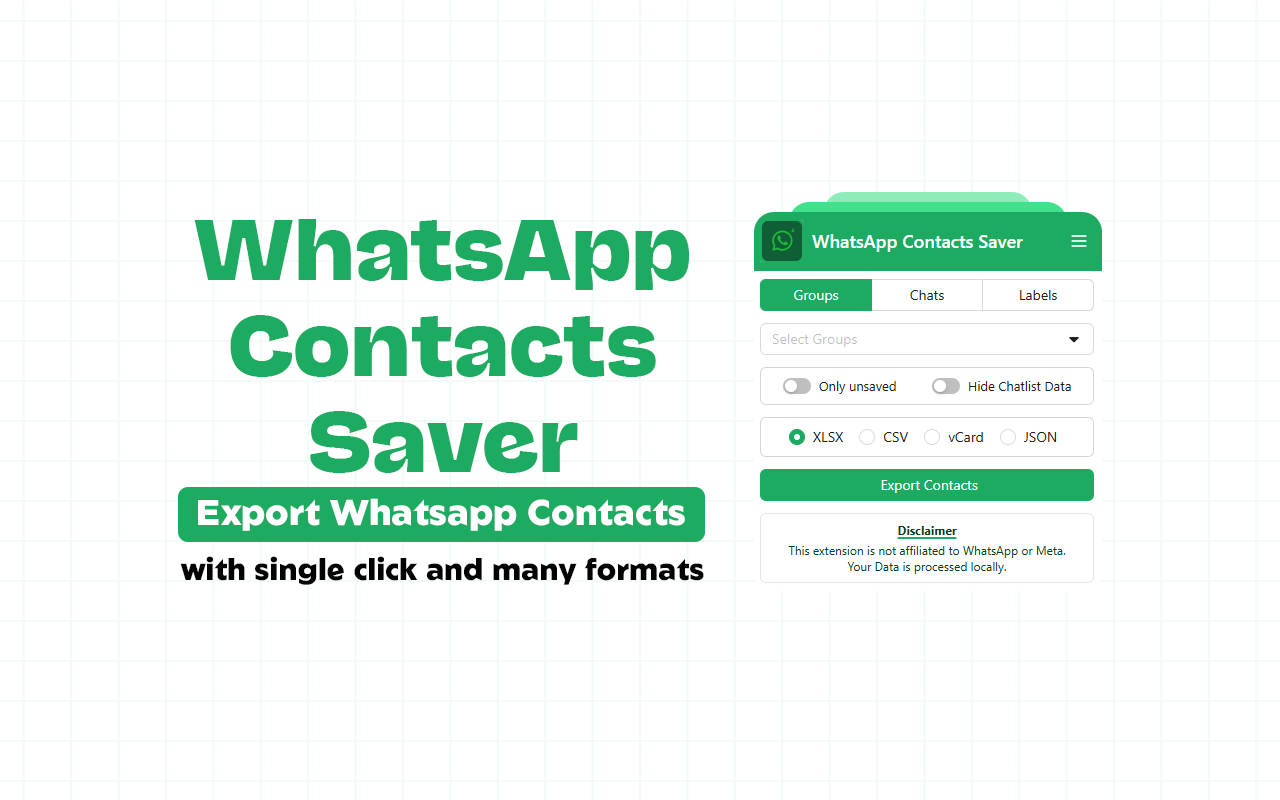
The best way to export WhatsApp group contacts is with a reliable Chrome extension like WhatsApp Contacts Saver. This tool simplifies extracting and saving contacts from WhatsApp Groups, individual Chats, and Business Labels directly from web.whatsapp.com.
Whether you’re a business owner managing leads, a community admin organizing members, or someone backing up important connections, manually copying numbers is tedious and error-prone. This extension handles it efficiently in multiple formats.
What is WhatsApp Contacts Saver?
WhatsApp Contacts Saver is a powerful, user-friendly Chrome extension built for seamless contact management. It lets you pull phone numbers, names (where available), and other details from your WhatsApp data without complex setups.
Key Highlights:
- Supports export to Excel (.xlsx), CSV, JSON, and vCard (.vcf) — perfect for spreadsheets, CRM imports, backups, or importing to other apps.
- Group search feature to quickly find specific groups by name, even with dozens or hundreds.
- Batch processing for exporting contacts from multiple groups at once — ideal for large-scale tasks.
- Clean, intuitive interface that’s beginner-friendly.
All processing happens locally in your browser — no data is uploaded to servers, prioritizing your privacy and security.
Important Note: This is an unofficial tool, not affiliated with or endorsed by WhatsApp Inc. (Meta). Always use it responsibly and comply with WhatsApp’s terms of service and local privacy laws.
Install it here: WhatsApp Contacts Saver on Chrome Web Store
Why Use a Chrome Extension to Export WhatsApp Contacts?
Native WhatsApp doesn’t offer direct bulk export for group members or chats (especially unsaved numbers). Common workarounds like screenshots, manual copying, or third-party apps risk data loss, time waste, or policy violations.
Benefits of tools like this extension:
- Speed — Extract hundreds of contacts in seconds instead of hours.
- Flexibility — Multiple formats suit different needs (Excel for analysis, vCard for phone imports, CSV for CRMs).
- Efficiency — Search and batch export save time for marketers, recruiters, event organizers, or sales teams.
- Privacy-focused — Local processing means your contacts stay on your device.
- No coding required — Unlike scripts or APIs, it’s point-and-click.
With growing WhatsApp usage for business and communities, efficient contact extraction remains essential for lead generation, follow-ups, and organization.
Step-by-Step Guide: How to Export WhatsApp Group Contacts Using WhatsApp Contacts Saver
- Install the Extension Go to the Chrome Web Store link above → Click Add to Chrome → Confirm installation. Pin the extension icon to your toolbar for easy access.
- Open WhatsApp Web Visit web.whatsapp.com in Google Chrome. Scan the QR code with your phone’s WhatsApp app to log in.
- Launch the Extension Click the extension icon (puzzle piece if not pinned) while on WhatsApp Web. Allow it to access page data if prompted — it needs this to read group/chat info.
- Wait for Data Load The popup will load your groups, chats, and labels automatically. This may take a few seconds depending on your account size.
- Select What to Export
- Use the group search bar to find specific groups quickly.
- Choose one or multiple groups/chats/labels.
- Pick options like saved contacts only, unsaved numbers, or all participants.
- Choose Export Format Select Excel, CSV, JSON, or vCard based on your needs:
- Excel/CSV → Great for spreadsheets and analysis.
- vCard → Import directly to phone contacts or apps.
- JSON → For developers or advanced use.
- Extract and Save Hit the Extract button. Wait for processing (progress shown). Download the file automatically — save it locally.
That’s it! Your contacts are now organized and ready for use.
Why Choose WhatsApp Contacts Saver Over Other Tools?
Many similar extensions exist (e.g., WAContactSaver, Contact Saver variants), but this stands out with:
- Batch multi-group export — Handle several groups simultaneously.
- Strong group search — Essential if you have many groups.
- Multiple reliable formats — Not all tools offer vCard or JSON.
- Regular updates — Developer focuses on improvements and compatibility.
- Local-only processing — Strong emphasis on data security.
Users often seek free or affordable options for bulk export without subscriptions. This tool delivers core functionality efficiently.
Tips for Best Results and Safety
- Use on a stable connection — large groups take longer to load.
- Export in smaller batches if you have thousands of contacts.
- Regularly update the extension for WhatsApp Web changes.
- Respect privacy — Only export contacts you have permission for; avoid spam.
- Backup exports securely — Excel/CSV files are easy to store or import.
If you’re tired of manual WhatsApp contact management, WhatsApp Contacts Saver transforms the process into a few clicks. Install today and streamline your workflow!
Ready to export your WhatsApp group contacts to Excel or CSV? Click here: Add WhatsApp Contacts Saver to Chrome
Have questions or need advanced tips? Drop a comment!